I kept one brand language at three densities and enlarged only the senior surface.
Senior Mode is a redesign exercise on JD Health's public app that I did during a UI design internship at Tencent in 2026. It is designed for older adults, their adult children and clinicians, in 39 screens on one token set. JD Health did not commission it, and it did not ship.
- Role
- Product direction, design decisions, design system, review of the generated screens
- Team
- Me, with Claude (AI). My internship mentor reviewed the work and gave feedback.
- Timeline
- June to August 2026
- Context
- UI design internship, Tencent, 2026
- Status
- Not shipped. 39 static screens on one token set and drawn wireflows, with no clickable prototype.
- Testing
- Usability tests with 27 participants, as I report them. The testers were not older adults.
- Scope
- A redesign exercise on JD Health's public app. JD Health did not commission it, and nothing was delivered to them. The JD Health logo and the Joy mascot are JD brand assets, shown only as the subject of the exercise. The people, names and health readings in the screens are made up.
- How it was made
- Product direction, design decisions and the design system are mine. Research legwork, screen generation through Figma MCP and the audit scripts were done with Claude (AI) under that direction.
The problem
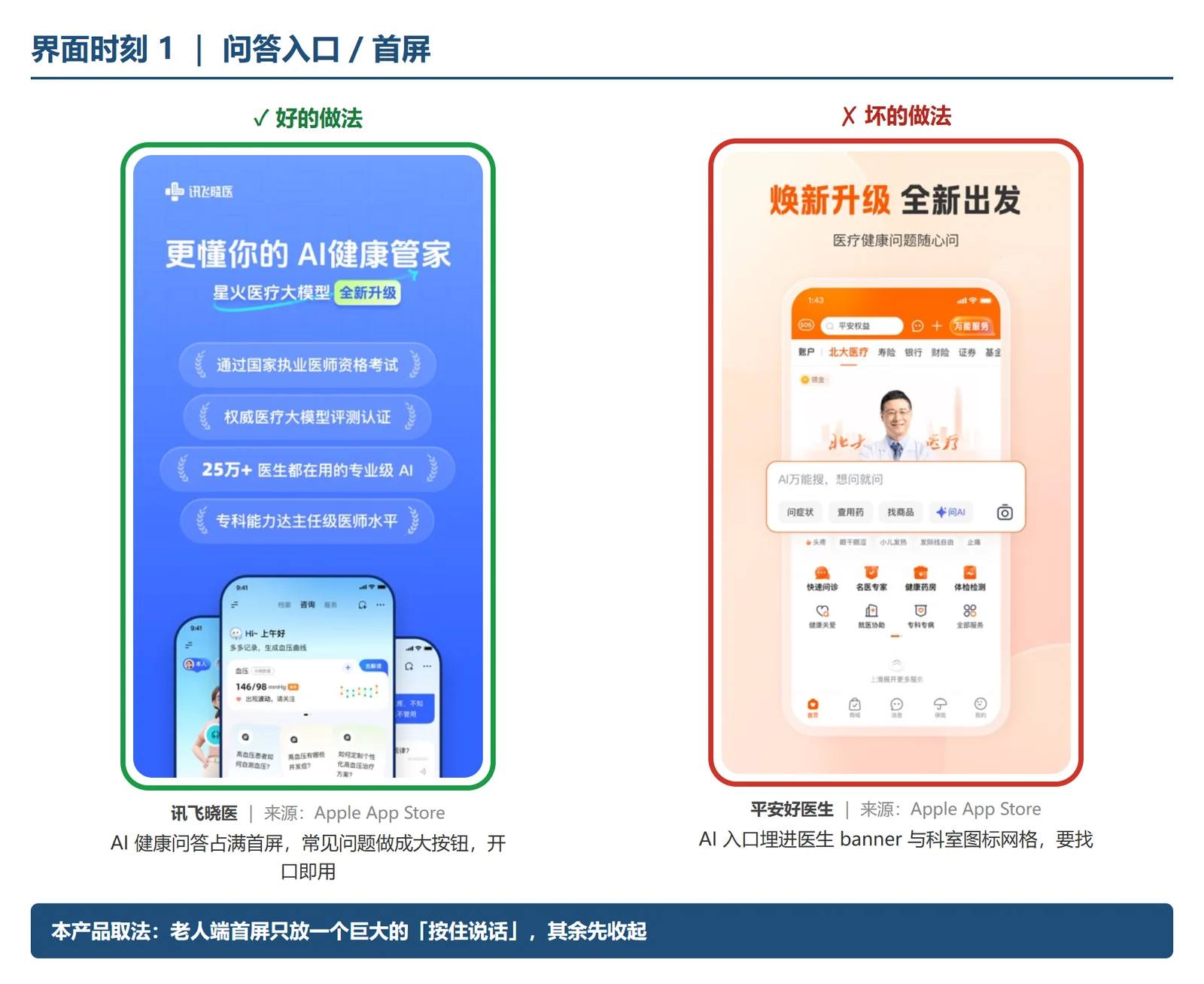
My internship brief was an AI health assistant for older adults. I took JD Health's public app as the subject because its home screen buries the way in for older users under feature grids and product shelves.
Bigger type suits only one of the three kinds of user the redesign had to serve.
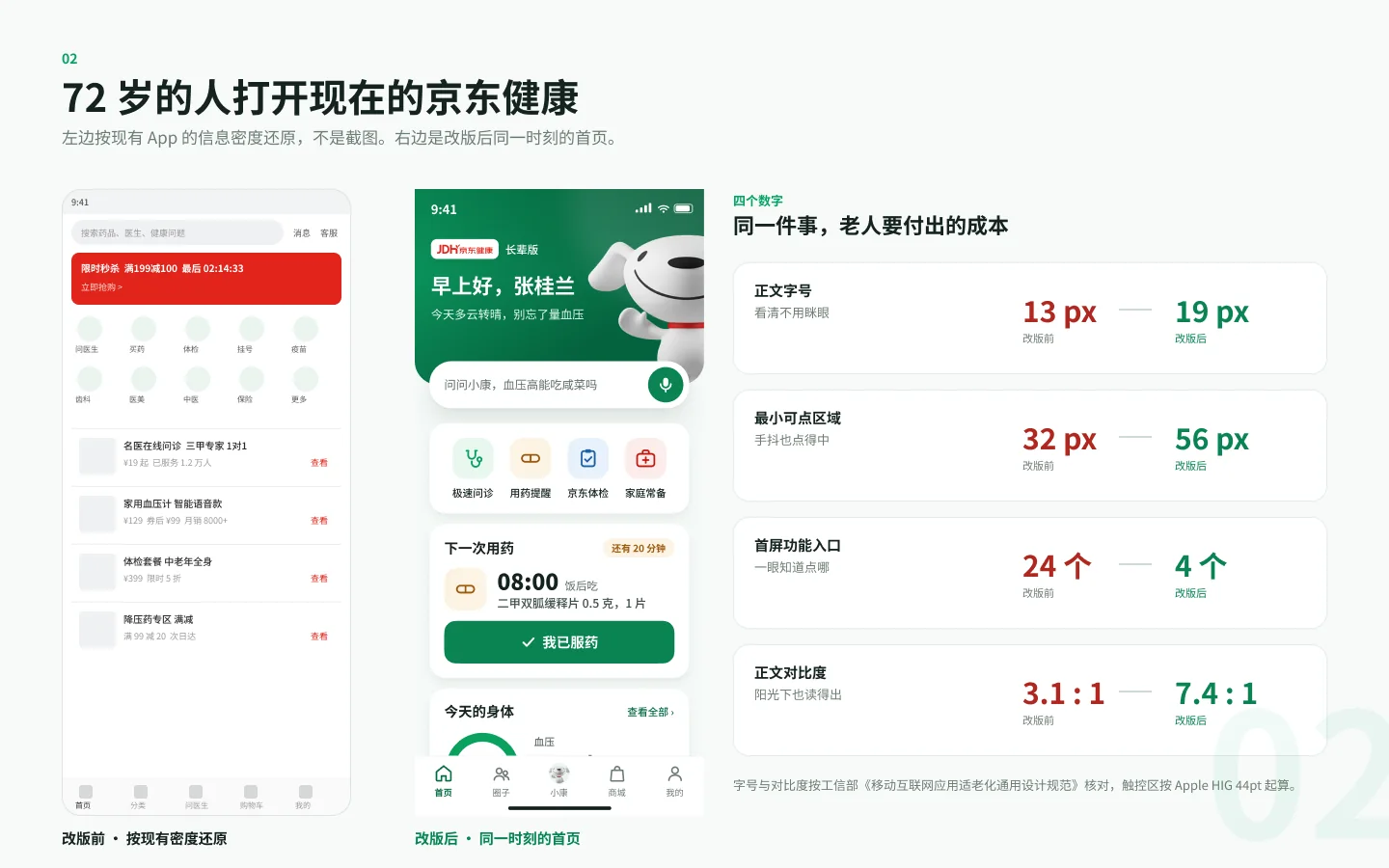
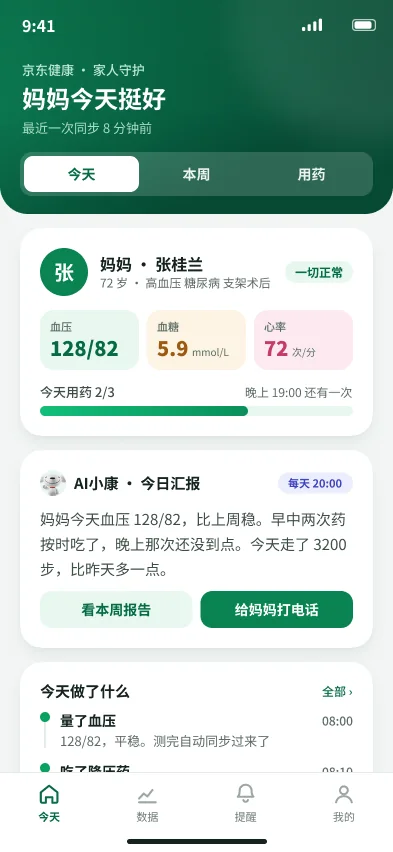
I kept the adult child and the clinician at their own density.
One enlarged layout for all three was on the table, and I turned it down. The adult child is an ordinary phone user and the clinician needs density, so senior rules would slow both of them down.
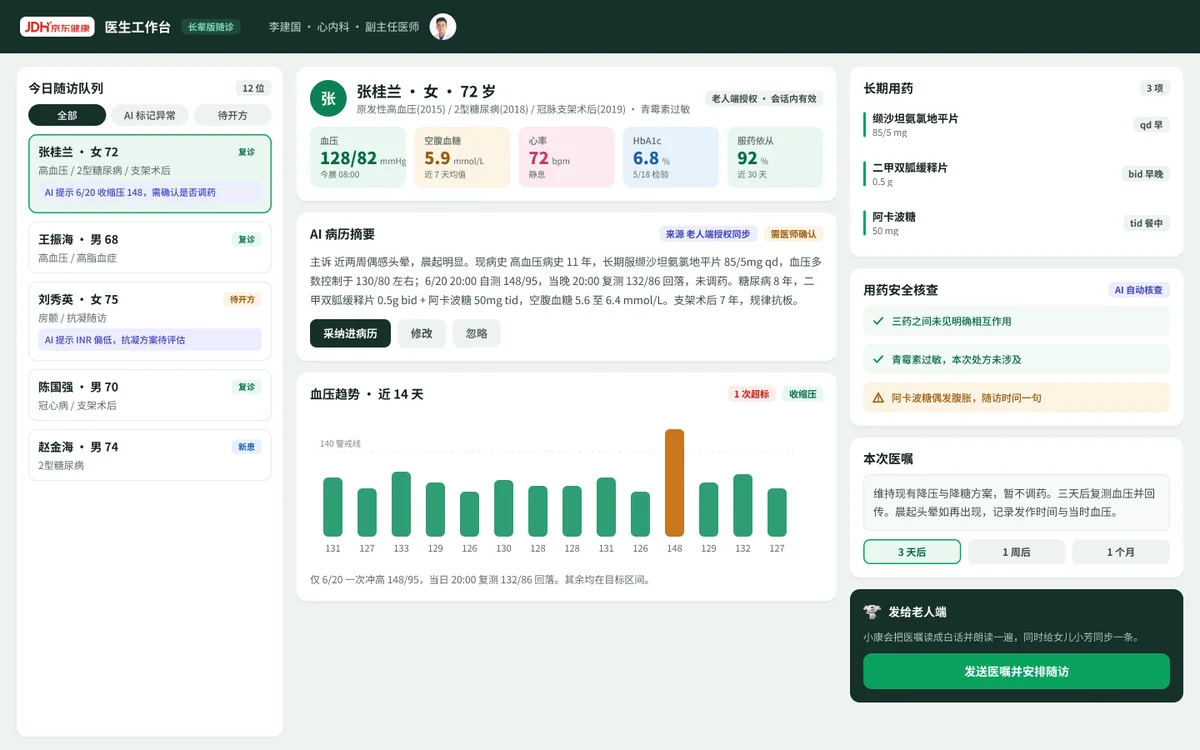
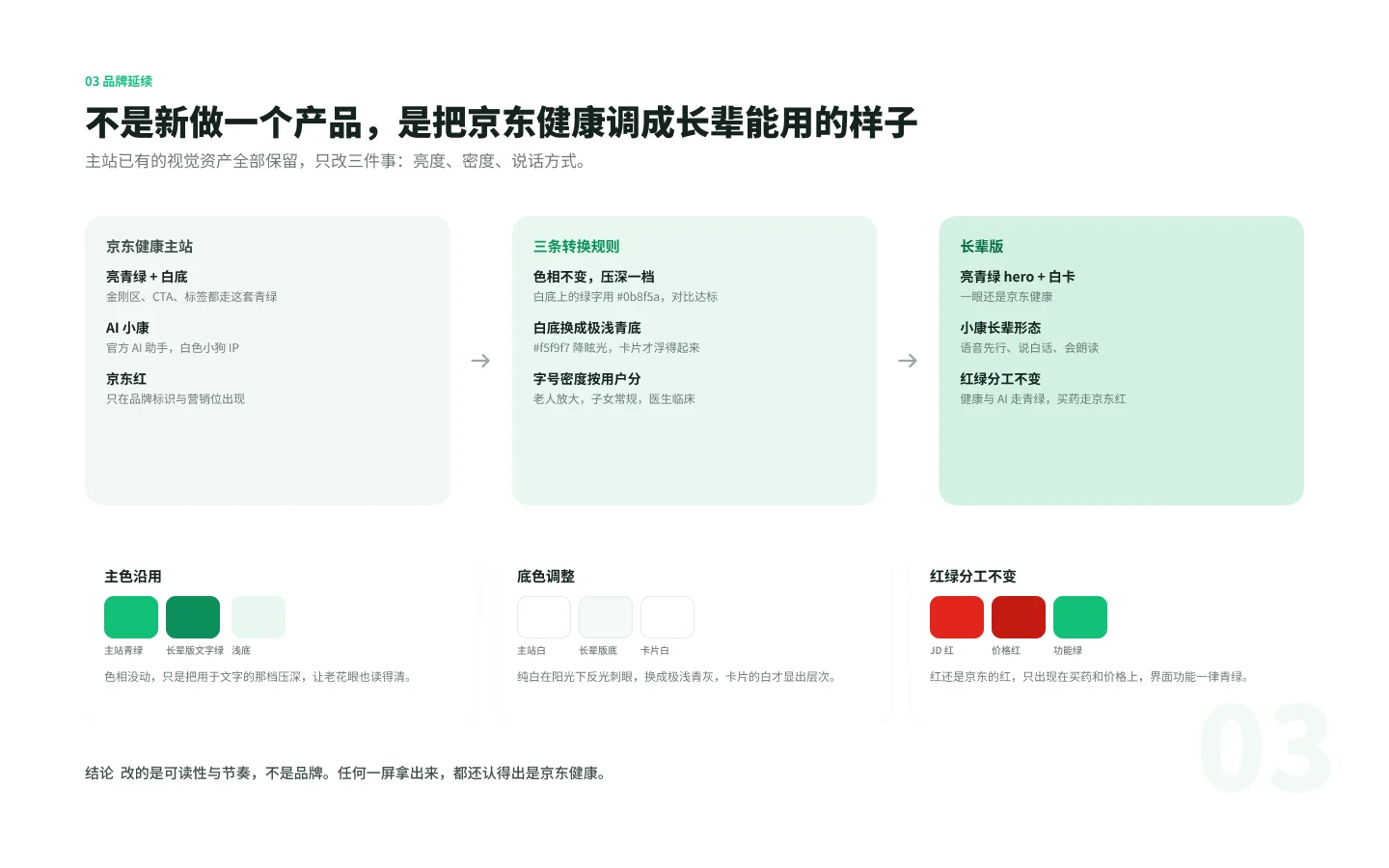
The brand stays fixed across the three surfaces and only the density changes. The older adult gets large type. The adult child's view keeps ordinary density, and the clinician works at clinical density, with abbreviations like qd and bid.
I derived the green from the parent brand and kept JD red to the logo and commercial slots.
I dropped an earlier dark-green direction after studying the real JD Health app. The primary is derived from the parent brand's green; white text on #0A8452 is about 4.7:1.
JD red appears only on the logo and in commercial slots, and purchase screens keep checkout in a bar pinned to the bottom. The page ground is a very pale green-grey instead of white.
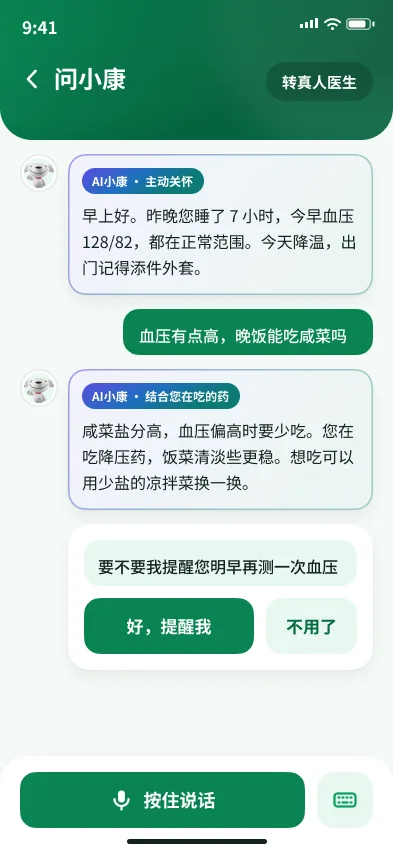
I gave anything the assistant writes its own colour and an AI label.
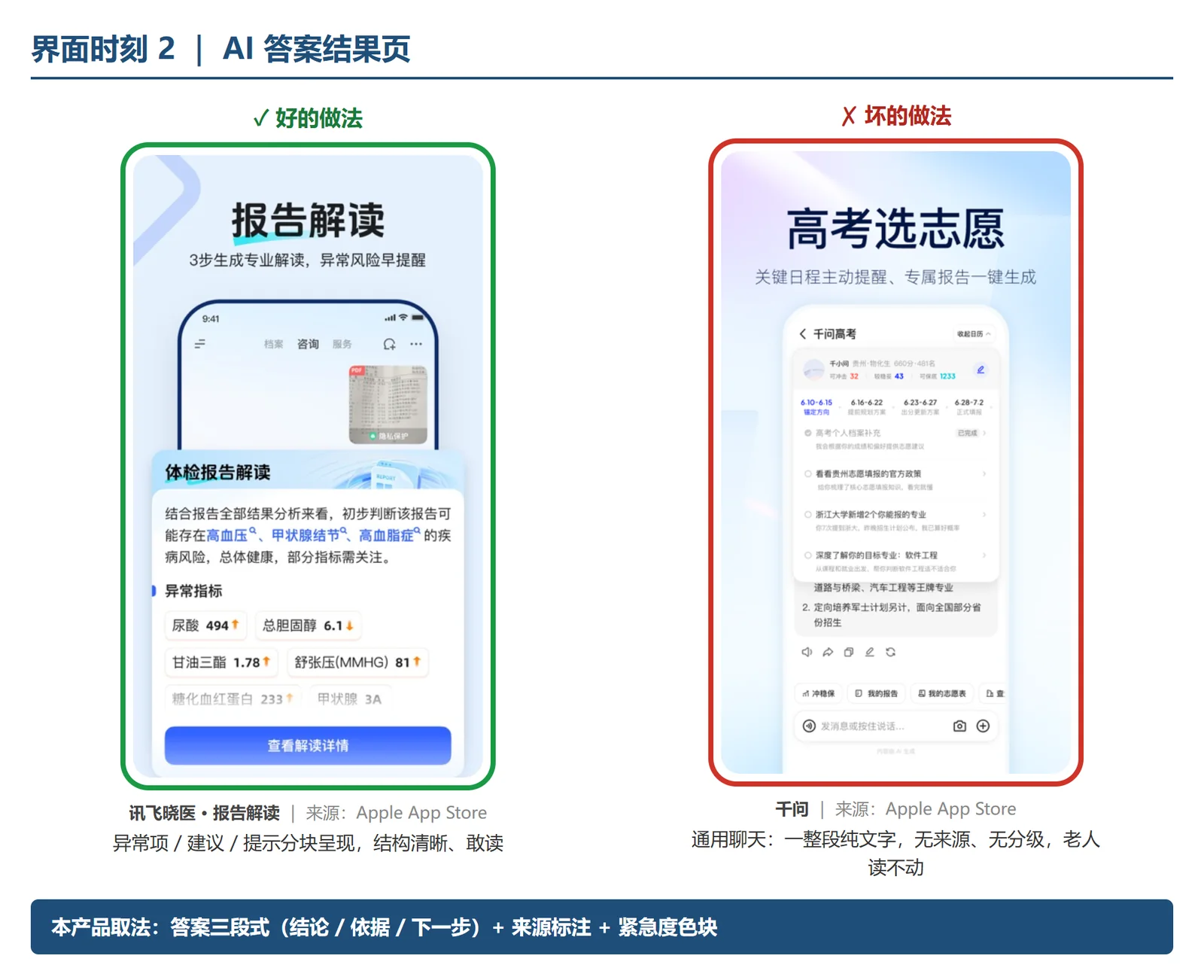
The competitive scan compared health apps on six moments, from finding the assistant to reading its answer. Each moment sets one app that handles it well beside one that does not.
In Senior Mode, everything the assistant writes sits in its own colour under a label that names it as AI and says what it drew on, so it cannot pass for a clinical reading. The chat header keeps a button that hands over to a human doctor.
I kept the mascot out of serious moments.
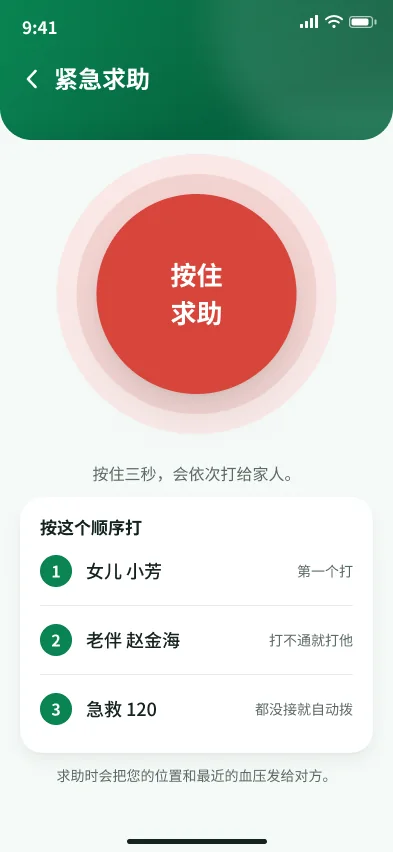
Joy, JD's mascot, sits beside the assistant in chat. It does not appear on the emergency screen, which holds one press-and-hold control and the order in which the phone calls for help.
What changed along the way
My internship mentor's verdict on the first version: it looked AI-made.
I insisted on studying the real JD Health app first, and dropped the original dark-green direction.
Whether all three surfaces needed the senior treatment became the question. They didn't, and the three densities came out of that.
The second version went into a new Figma file.
My mentor gave five points of feedback.
Claude ran the consistency audit script across the screens.
Checks
Each number has a source or a date. The audit counts came from a script Claude ran.
Figma file, audit of 2 Aug 2026
39
screens, 27 senior, 8 adult child and 4 clinician, on one token set of 27 colour variables, 20 text styles and 3 elevations. The audit script Claude ran found the three rows below.
38
cards missing their shadow layer.
10
greens that had drifted apart.
10
button heights, from 41 to 62.
Primary green
4.7:1
white text on #0A8452. WCAG contrast formula, 4.73:1. Board 10 gives the same figure.
Reconstructed home screen
13 to 19px
body text.
32 to 56px
smallest tap target.
3.1 to 7.4:1
body text contrast. Measured on board 02. The before side is the reconstruction Claude built after the new screens were done, not a screenshot of the app.
Usability tests
27 people took part. They surfaced 4 issues, all fixed, and task completion rose by 21% from before the redesign to after it. All three figures are my own report of the round.
Gaps
The testers were not older adults.
The tests showed whether people could finish the tasks. Whether the type and contrast work for older eyes still rests on published guidance. The next round would be sessions with people in the target age range, on their own phones.
The test write-up is thin.
The counts under Checks are mine. The four issues, the tasks, the testers' ages, and whether +21% is percentage points or a relative change are not documented on this page.
The before state is a reconstruction.
Claude rebuilt the current home screen at its real density after the new screens were finished, and the before numbers were measured on it.
There is no clickable prototype.
The deliverable is static high-fidelity screens plus drawn wireflows.